


Write smarter with
AI-Powered documents
Generate polished documents, refine them with AI, and keep every draft grounded in your own files, research, and workflow.
Built for teams who care about their documents.
From solo founders to growing teams — NextDoc helps you write smarter, faster.








Core writing workflows, built in
Instant document generation.
Describe what you need and get a structured draft with headings and formatting already in place.
Q3 Strategy Report
Write a comprehensive product roadmap covering Q3 milestones, feature priorities, and team ownership across all squads.
AI write & chat mode.
Ask AI to rewrite, expand, or restructure a section directly in the editor.
Our Q2 results showed solid growth exceptional momentum across all segments, with revenue up driven by 34% year-over-year.
This positions us well for H2 execution.
Multiple AI models
Use ChatGPT, Claude, Gemini, and more. Pick the right model per task or let NextDoc choose.
- GPT-5.4Pro
- GPT-5.4 ThinkingPlus
- Claude Opus 4.6Plus
- Claude Sonnet 4.6Pro
- Gemini 3.1 ProPro
- Gemini 3 Deep ThinkFree
Anthropic's most powerful model — exceptional for nuanced, long-form writing.
Smart rewriting & transforms.
Shorten, expand, paraphrase, or translate selected text in a click.
Humanize AI content.
Make AI text read naturally when a draft needs a more human tone.
Humanize Content
Next sentence suggestions.
Get contextual sentence completions as you write. Tab to accept, or cycle through alternatives.
The product has shown strong performance across all key metrics, with revenue growing 34% year-over-year.
This positions us well for H2 execution — with a clear roadmap and committed teams ready to accelerate delivery.
Custom AI prompts.
Select any text, write a custom instruction, and let AI transform it exactly how you need.
Ground every draft in the right context
Models, web research, and your own files work together so the draft starts strong and stays grounded.
| Month | Units | Share |
|---|---|---|
| Jan | 42 | 44% |
| Feb | 68 | 72% |
| Mar | 55 | 58% |
Charts & tables from text.
Use ChatGPT, Claude, Gemini, and more. Pick the right model per task or let NextDoc choose.
Web APIs: Fetch API — MDN
openai/openai-node: Node.js SDK
How to stream chat completions in JS
AI SDK — Streaming responses with Next.js
Streaming in Next.js uses the 1 Vercel AI SDK with 2 ReadableStream to progressively deliver tokens…
Web research
Pull live sources into drafts so documents stay current and grounded.
Reference files
Use PDFs, Word docs, and notes as working context for each document.
Key capabilities for serious writing
The essentials for drafting, editing, translating, sharing, and exporting in one place.
Choose your AI
Switch models per document to balance quality, speed, or creativity.
Built-in structure
Auto tables of contents, section flow, and word budgets keep long documents clear.
AI translation
Translate a whole document or a selected passage instantly.
Next sentence suggestions
Keep momentum with one-click sentence suggestions as you write.
Never lose a version
Restore any saved version when you need to roll back.
Project workspace
Keep documents, notes, and files together as shared context.
Share & collaborate
Share by link or email with view or edit access.
Export ready, client ready
Download polished documents as Word, PDF, or HTML.
What people are saying
Being able to switch between Claude, Gemini, and ChatGPT per document is a game changer. I use the right model for the right task every time.
The web-powered research feature is unlike anything I've used. NextDoc pulls live sources right into the document — my reports are always current and cited.
I uploaded my old PDFs and Word docs as context and NextDoc wrote a full proposal grounded in my own materials. Incredible — no hallucinations, just solid output.
Sharing a document by link with view-only access took seconds. My clients can review without signing up — that alone sold our team on NextDoc.
Exporting to Word, PDF, and HTML means I never have to reformat anything for a client. The output is polished and ready to send every single time.
I described what I needed in plain English and NextDoc generated a complete, structured document in under a minute. The speed is genuinely hard to believe.
Version history saved me twice this month. I accidentally overwrote a section and restored the previous version with one click — no panic, no lost work.
The project workspace keeps all my documents, notes, and reference files in one place. I can start a new doc with full context from everything in the project.
Next sentence suggestions feel like autocomplete that actually understands what I'm writing. I accept them constantly — my drafting speed has doubled.
We operate in four languages and the AI translation is accurate enough that native speakers sign off without edits. It's replaced a whole translation workflow.
The auto table of contents and section flow keep my long reports readable. Word budgeting stops me from going off on tangents — which I always do without it.
The desktop app on my Mac is fast, distraction-free, and works offline. It's exactly what a writing tool should feel like — no browser tabs, just focus.
Pricing
Start for free. Upgrade when you need more power.
Free
Free for everyone
Pro
Save 55% with yearlyPower
Save 59% with yearlyGot Questions?
If you can't find what you're looking for, get in touch.
Mobile & desktop apps
Native apps are on the way, built for speed and focus across every device.
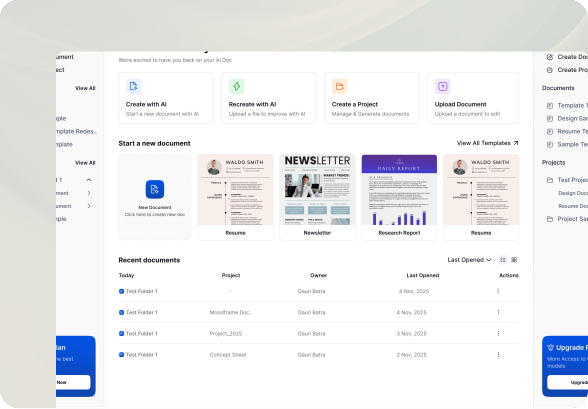
Desktop app
Available for macOS
A focused Mac app with offline access and fast document switching.
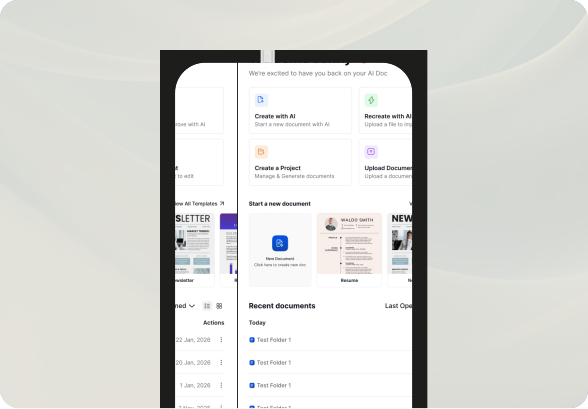
Mobile app
Available for iOS
Review, edit, and approve documents from iPhone when you're away from your desk.